
Identity Schema Configuration
The schema is the product. Every identity resolution decision in Kanoniv flows from a single YAML file - the identity schema. No imperative code, no hidden configuration, no pipeline wiring. You declare what identity means, and the engine figures out how.
Most users don't need this page first
The Cloud Quickstart auto-discovers signals and bootstraps a schema for you. Come here when you want to customize matching behavior beyond what the engine infers automatically.
Philosophy
Traditional identity resolution tools require you to build pipelines, write matching logic in code, and manage complex ETL workflows. Kanoniv inverts this: you write a declarative identity schema, and the engine handles everything else.
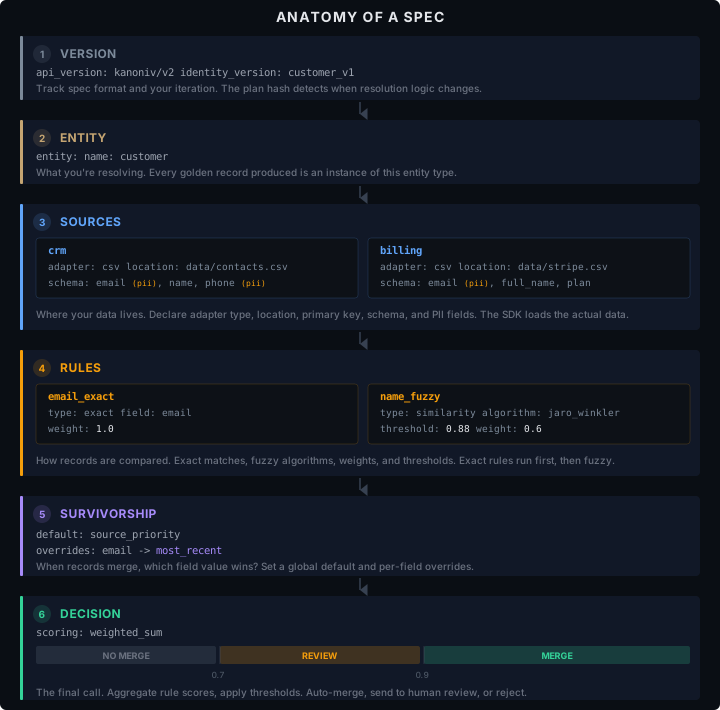
The full schema below is copy-paste ready. Each numbered section in the diagram above maps to a section in this YAML:
# This is a complete identity resolution configuration.
# No code. No pipelines. Just a schema.
api_version: kanoniv/v2
identity_version: customer_v1

entity:
  name: customer

sources:
  crm:
    adapter: csv
    location: data/contacts.csv
    primary_key: id
    schema:
      email: { type: string, pii: true }
      name: { type: string }
      phone: { type: string, pii: true }

  billing:
    adapter: csv
    location: data/stripe_customers.csv
    primary_key: customer_id
    schema:
      email: { type: string, pii: true }
      full_name: { type: string }
      plan: { type: string }

rules:
  - name: email_exact
    type: exact
    field: email
    weight: 1.0

  - name: name_fuzzy
    type: similarity
    field: name
    algorithm: jaro_winkler
    threshold: 0.88
    weight: 0.6

survivorship:
  default: source_priority
  overrides:
    - field: email
      strategy: most_recent

decision:
  scoring: weighted_sum
  thresholds:
    match: 0.9
    review: 0.7
Schema Lifecycle
Every identity schema goes through a well-defined lifecycle. Each stage catches a different class of problem - and each stage runs locally, in milliseconds, before you ever touch production data.
Author  →  Validate  →  Plan  →  Diff  →  Reconcile
  │           │          │        │          │
  │           │          │        │          └─ Run against real data
  │           │          │        └─ Compare spec versions
  │           │          └─ Preview execution plan + risk analysis
  │           └─ Check schema + semantic + tier correctness
  └─ Write YAML in your editor
1. Author
Write your identity schema in any text editor. Use the Schema Reference as a guide for every available key. The schema is standard YAML - it works with any editor, linter, or version control system.
2. Validate
What it does: Catches every category of schema error before you run anything - structural mistakes, logical contradictions, and tier-restricted features.
from kanoniv import Spec, validate

spec = Spec.from_file("customer-spec.yaml")
result = validate(spec)

if result:
    print("Spec is valid")
else:
    for error in result.errors:
        print(f"  {error}")
Validation runs three independent passes over your schema:
Schema Validation
Checks structural correctness — are the required fields present? Are values the right type? Are bounds respected?
| Check | What It Catches |
|---|---|
| Required fields | Missing api_version, identity_version, entity.name |
| API version format | api_version must start with kanoniv/v |
| Rule limits | Maximum 50 rules, each must have name and type |
| Source limits | Maximum 10 sources, each must have name and primary_key |
| Weight bounds | Rule weights must be between 0.0 and 1.0 |
| Threshold bounds | Thresholds must be between 0.0 and 1.0 |
| Blocking limits | Maximum 5 blocking keys |
Semantic Validation
Checks logical correctness - do the pieces of your schema make sense together?
| Check | What It Catches |
|---|---|
| Field references | Rule references a field that doesn't exist in any source schema |
| Duplicate rule names | Two rules named email_match — which one fires? |
| Duplicate source names | Two sources named crm — which one wins survivorship? |
| Threshold ordering | match threshold must be ≥ review threshold |
| Field suggestions | If a field reference is wrong, suggests similar field names |
Cloud Feature Detection
If your schema uses cloud-only features (freshness, governance, compliance, hierarchy, audit configuration, or PII masking), the validator flags them so you know what requires Kanoniv Cloud before you run.
ValidationResult
The result object is designed to work naturally in Python:
result = validate(spec)

# Boolean — use in if statements
if not result:
    print("Invalid!")

# Errors list
for error in result.errors:
    print(error)
# "Rule 'name_fuzzy' references field 'full_name' which is not in source 'crm' schema.
#  Did you mean 'name'?"

# Raise on error — useful in scripts and CI
result.raise_on_error()  # raises ValueError with all errors if invalid

# Properties
result.valid   # True/False
result.errors  # ["error 1", "error 2", ...]
Why Validate Matters
Every other lifecycle stage assumes a valid schema. If you skip validation:
plan()might generate a plan with missing stagesreconcile()might silently skip rules that reference non-existent fields- Threshold ordering bugs could merge records that should be reviewed
Always validate before running. reconcile() calls validate() internally and raises on error — but running it yourself first gives you clean error messages instead of a stack trace.
3. Plan
What it does: Static analysis of your schema - before touching any data. The plan shows you exactly what the engine will do, in what order, and flags potential risks.
from kanoniv import Spec, plan

spec = Spec.from_file("customer-spec.yaml")
execution_plan = plan(spec)

print(execution_plan.summary())
Plan for entity 'customer' (v1.0)
Sources: crm (3 fields), billing (3 fields)
Matching: 2 rules (1 exact, 1 fuzzy)
Blocking: email (estimated reduction: high)
Survivorship: source_priority (crm > billing)
Risk flags: 0 critical, 0 high, 0 medium
Plan hash: sha256:a1b2c3d4...Execution Stages
The plan breaks reconciliation into 8 discrete stages, each with inputs and outputs:
| Stage | What Happens |
|---|---|
| 1. Normalize | Standardize emails, names, phones across all sources |
| 2. Block | Generate blocking keys to reduce comparison space |
| 3. Exact Match | Evaluate exact-match rules (deterministic, fast) |
| 4. Fuzzy Match | Evaluate similarity rules (algorithms, thresholds) |
| 5. Score & Decide | Aggregate rule scores, apply thresholds → Merge / Review / NoMerge |
| 6. Cluster | Transitive closure — if A=B and B=C, then A=B=C |
| 7. Survivorship | Pick winning values for each field in each cluster |
| 8. Emit | Produce golden records, decisions, and telemetry |
for stage in execution_plan.execution_stages:
    print(f"{stage['name']}: {stage['description']}")
    print(f"  Inputs:  {stage['inputs']}")
    print(f"  Outputs: {stage['outputs']}")
Match Strategies
See exactly how each rule will be evaluated:
for strategy in execution_plan.match_strategies:
    print(f"Rule: {strategy['rule_name']}")
    print(f"  Type: {strategy['match_type']}, Field: {strategy['field']}")
    print(f"  Algorithm: {strategy.get('algorithm', 'exact')}")
    print(f"  Threshold: {strategy.get('threshold', 'N/A')}, Weight: {strategy['weight']}")
    print(f"  Evaluation order: {strategy['evaluation_order']}")
Rules are ordered by evaluation cost — exact matches (cheap) run before fuzzy matches (expensive). This ordering is automatic.
Risk Flags
The plan performs static risk analysis and flags potential problems before you hit them at runtime:
| Severity | Flag | What It Means |
|---|---|---|
| Critical | NO_BLOCKING | No blocking strategy — O(n²) pairwise comparisons. 10k records = 50M comparisons |
| High | SINGLE_SIGNAL | Only one match rule — no signal diversity, high false-positive risk |
| High | LOW_THRESHOLD | Fuzzy rule threshold below 0.8 — will match loosely |
| High | PHONE_WITHOUT_BLOCKING | Phone matching without blocking — phone numbers get recycled |
| Medium | HIGH_WEIGHT_FUZZY | Fuzzy rule weight above 0.9 — one fuzzy match can force a merge |
| Medium | NO_SURVIVORSHIP | No survivorship rules — arbitrary field selection |
| Medium | NO_REVIEW_THRESHOLD | No review band — everything is either merged or rejected |
| Low | SINGLE_SOURCE | Only one source — no cross-system matching |
| Low | MISSING_TEMPORAL | No temporal strategy — not time-aware |
for flag in execution_plan.risk_flags:
    print(f"[{flag['severity']}] {flag['code']}: {flag['message']}")
    print(f"  Recommendation: {flag['recommendation']}")
[critical] NO_BLOCKING: No blocking strategy configured. All entity pairs will
be compared (O(n²)).
Recommendation: Add a blocking key (e.g., email domain, zip code) to reduce
comparison space.Plan Hash
The plan hash is a SHA-256 digest of the canonical schema. Use it to detect when schema changes affect execution:
print(execution_plan.plan_hash)
# "sha256:a1b2c3d4e5f6..."

# Store the hash in CI - if it changes, the schema changed
if execution_plan.plan_hash != last_deployed_hash:
    print("Schema has changed - review before deploying")
PlanResult Reference
execution_plan.entity              # "customer"
execution_plan.plan_hash           # "sha256:..."
execution_plan.execution_stages    # list of 8 stage dicts
execution_plan.match_strategies    # list of rule evaluation details
execution_plan.survivorship        # list of field-level survivorship config
execution_plan.blocking            # blocking analysis with estimated reduction
execution_plan.risk_flags          # list of risk flag dicts
execution_plan.summary()           # human-readable multi-line summary
execution_plan.to_dict()           # full plan as serializable dict (for CI/CD)
4. Diff
What it does: Compares two schema versions and produces a structured changelog - which rules were added, removed, or modified, and whether thresholds changed. Essential for schema governance in teams.
from kanoniv import Spec, diff

old_spec = Spec.from_file("customer-spec-v1.yaml")
new_spec = Spec.from_file("customer-spec-v2.yaml")

changes = diff(old_spec, new_spec)
print(changes.summary)
Diff: 1 added, 0 removed, 1 modified. Thresholds changed: True. Version: 1.0 -> 2.0What Gets Compared
| Section | Diff Detects |
|---|---|
| Rules | Added, removed, or modified rules (weight changes, threshold changes) |
| Thresholds | Any change to decision.thresholds (match, review) |
| Version | identity_version change between specs |
# Rules added in the new spec
for rule_name in changes.rules_added:
    print(f"+ {rule_name}")
# + phone_fuzzy

# Rules removed from the old spec
for rule_name in changes.rules_removed:
    print(f"- {rule_name}")

# Rules that changed
for change in changes.rules_modified:
    print(f"~ {change['name']}: {change['field']} {change['old_value']} → {change['new_value']}")
# ~ name_fuzzy: weight 0.6 → 0.8

# Threshold changes
if changes.thresholds_changed:
    print("⚠ Thresholds changed — this affects merge/review decisions")
Using Diff in CI/CD
Diff is designed for automated governance. Add it to your CI pipeline to catch risky changes before they reach production:
# ci_check.py - run on every PR that touches a schema file
from kanoniv import Spec, diff
import sys

old = Spec.from_file("specs/customer-spec.yaml")       # main branch
new = Spec.from_file("specs/customer-spec-pr.yaml")     # PR branch

changes = diff(old, new)

# Hard block: threshold changes require explicit approval
if changes.thresholds_changed:
    print("BLOCKED: Threshold changes require sign-off from data governance.")
    print(f"  {changes.summary}")
    sys.exit(1)

# Warn: rule modifications change matching behavior
if changes.rules_modified:
    print(f"WARNING: {len(changes.rules_modified)} rule(s) modified.")
    for change in changes.rules_modified:
        print(f"  {change['name']}: {change['field']} {change['old_value']} → {change['new_value']}")

# Info: new rules are generally safe
if changes.rules_added:
    print(f"INFO: {len(changes.rules_added)} new rule(s) added: {', '.join(changes.rules_added)}")
DiffResult Reference
changes.rules_added        # ["phone_fuzzy", "company_exact"]
changes.rules_removed       # ["old_rule"]
changes.rules_modified      # [{"name": "...", "field": "weight", "old_value": "0.6", "new_value": "0.8"}]
changes.thresholds_changed  # True/False
changes.summary             # "Diff: 1 added, 0 removed, 1 modified. Thresholds changed: True."
5. Reconcile
What it does: Runs the full identity resolution pipeline - the only stage that touches actual data. Takes your sources and schema, and produces golden records, match decisions, and runtime telemetry. Everything runs locally through the native Rust engine via PyO3.
from kanoniv import Spec, Source, reconcile

spec = Spec.from_file("customer-spec.yaml")
sources = [
    Source.from_csv("crm", "data/contacts.csv"),
    Source.from_csv("billing", "data/stripe.csv"),
]

result = reconcile(sources, spec)
What Happens Internally
When you call reconcile(), the SDK orchestrates a multi-stage pipeline:
1. Validate spec (raises on error)
         │
2. Collect entities from all sources
         │
3. Map source columns to canonical fields (via attributes)
         │
4. Serialize to JSON → pass to native Rust engine (GIL released)
         │
    ┌────┴────────────────────────────────────────────┐
    │  Rust Engine (parallel via rayon)                │
    │                                                  │
    │  5. Generate blocking keys                       │
    │  6. Pairwise evaluation within each block        │
    │     → Exact rules first, then fuzzy rules        │
    │     → Score aggregation (weighted sum)            │
    │     → Apply thresholds: Merge / Review / NoMerge │
    │  7. Transitive clustering (UnionFind)             │
    │  8. Survivorship → golden records                │
    │  9. Collect telemetry                            │
    └────┬────────────────────────────────────────────┘
         │
10. Return ReconcileResult to Python
The heavy lifting (steps 5–9) runs in native Rust with the Python GIL released, which means it uses all available CPU cores via rayon parallelism.
Inspecting Results
Clusters — groups of record IDs that resolved to the same entity:
for i, cluster in enumerate(result.clusters):
    if len(cluster) > 1:
        print(f"Cluster {i + 1}: {cluster}")
# Cluster 1: ['crm:1', 'billing:cus_001']
# Cluster 2: ['crm:2', 'billing:cus_002']
Golden records — the merged, survivorship-applied output:
for record in result.golden_records:
    print(record)
# {'email': '[email protected]', 'name': 'John Doe', 'plan': 'enterprise'}
Decisions — why each pair was merged, reviewed, or rejected:
for decision in result.decisions:
    print(f"{decision['entity_a_id']} ↔ {decision['entity_b_id']}")
    print(f"  Outcome: {decision['decision']} (confidence: {decision['confidence']:.2f})")
    print(f"  Matched on: {decision['matched_on']}")
    for rule in decision['rule_results']:
        print(f"    {rule['rule_name']}: {rule['score']:.2f} (weight: {rule['weight']})")
crm:1 ↔ billing:cus_001
Outcome: Merge (confidence: 0.94)
Matched on: ['email_exact', 'name_fuzzy']
email_exact: 1.00 (weight: 1.0)
name_fuzzy: 0.91 (weight: 0.6)Telemetry — runtime performance metrics:
telemetry = result.telemetry
print(f"Blocking groups: {telemetry['blocking_groups']}")
print(f"Pairs evaluated: {telemetry['pairs_evaluated']}")
print(f"Decisions: {telemetry['decisions_by_type']}")
# Decisions: {'Merge': 340, 'Review': 12, 'NoMerge': 1580}

for rule in telemetry['rule_telemetry']:
    print(f"  {rule['rule_name']}: {rule['evaluated']} evaluated, "
          f"{rule['matched']} matched, avg score {rule['avg_score']:.2f}")
Aggregate Metrics
print(f"Clusters: {result.cluster_count}")        # total canonical entities
print(f"Merge rate: {result.merge_rate:.1%}")      # fraction of records merged

# Export to pandas for analysis
df = result.to_pandas()
print(df.head())
The merge rate tells you what fraction of input records were merged with another record. A merge rate of 0.45 means 45% of records found at least one match — the remaining 55% are singletons.
ReconcileResult Reference
result.clusters         # list[list[str]] — grouped record IDs
result.golden_records   # list[dict] — merged entity data
result.decisions        # list[dict] — per-pair match decisions with scores and rules
result.telemetry        # dict — blocking groups, pairs evaluated, rule performance
result.cluster_count    # int — number of canonical entities
result.merge_rate       # float — fraction of records that merged (0.0–1.0)
result.to_pandas()      # pandas.DataFrame of golden records
From Minimal to Full-Featured
Identity schemas are designed to grow with your needs. Start simple and add capabilities as requirements evolve:
| Complexity | What You Add | Tier |
|---|---|---|
| Minimal | entity, sources, rules, decision | Local |
| Standard | survivorship, blocking, composite rules, field overrides | Local |
| Advanced | similarity rules, sampling, review queue | Local |
| Cloud | compliance, audit, hierarchy, exclusions, freshness, governance | Cloud |
Section Guide
| Page | What You'll Learn |
|---|---|
| Schema | Every top-level key with type, default, and tier requirement |
| Sources | Adapter configuration, primary keys, freshness, schema validation |
| Rules | Rule types, algorithms, weights, blocking, composites |
| Survivorship | Strategies, per-field overrides, aggregate functions |
| Decision | Scoring, thresholds, conflict resolution, review queue |
| Entity | Entity configuration, compliance, hierarchy |
| Governance | Metadata, governance policies, exclusions, relations |